TurboVui Pocket1.0.3
Publisher Description
Now on IPhone!
Finally, the functionality of the popular TurboVUi Solo software for your Android device!
TurboVUi software provides remote access to MOTOTRBO radios via IP Networks.
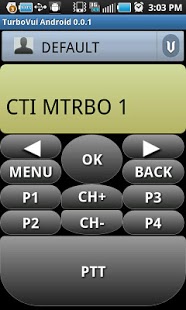
TurboVUi Pocket presents a virtual radio on an Android device. With a network connection, group or private calls are as easy as making a selection from the subscriber list, then clicking the Push-to-Talk button. Use TurboVUi Pocket for simultaneous radio sharing instead of tone remotes; this simpler solution allows users of the shared radio to have push-to-talk and listen capabilities, as well as access to all other radio functions. TurboVUi Pocket can also be used for situations when someone is outside of radio coverage, yet still needs to communicate on the radio system, such as:
•Supervisory remote monitoring of radio channels
•A home office that is beyond the coverage area of a radio system
•A temporary travel situation removing you from the coverage area
With TurboVUi Pocket and an IP connection, users can stay in "radio" contact.
About TurboVui Pocket
The company that develops TurboVui Pocket is CTI Products. The latest version released by its developer is 1.0.3. This app was rated by 1 users of our site and has an average rating of 5.0.
To install TurboVui Pocket on your Android device, just click the green Continue To App button above to start the installation process. The app is listed on our website since 2014-03-21 and was downloaded 14 times. We have already checked if the download link is safe, however for your own protection we recommend that you scan the downloaded app with your antivirus. Your antivirus may detect the TurboVui Pocket as malware as malware if the download link to com.products.cti is broken.
How to install TurboVui Pocket on your Android device:
- Click on the Continue To App button on our website. This will redirect you to Google Play.
- Once the TurboVui Pocket is shown in the Google Play listing of your Android device, you can start its download and installation. Tap on the Install button located below the search bar and to the right of the app icon.
- A pop-up window with the permissions required by TurboVui Pocket will be shown. Click on Accept to continue the process.
- TurboVui Pocket will be downloaded onto your device, displaying a progress. Once the download completes, the installation will start and you'll get a notification after the installation is finished.
Program Details
System requirements
Download information
Pricing
Version History
version 1.0.3
posted on 2014-03-21
Please submit bug reports.,Required minimum server version: 5.0.3,Bug fix for PTT on Android 4.4 (KitKat),Bug fix for duplicate popups in login screen.
version 1.0.1
posted on 2013-06-24
Several fixes and updates
